Understanding how much money you actually receive after taxes and payroll deductions is essential for budgeting, financial planning, and making informed employment decisions. A Texas Paycheck Calculator helps employees estimate their take-home pay by accounting for federal income tax, Social Security, Medicare, retirement contributions, health insurance premiums, and other payroll deductions.
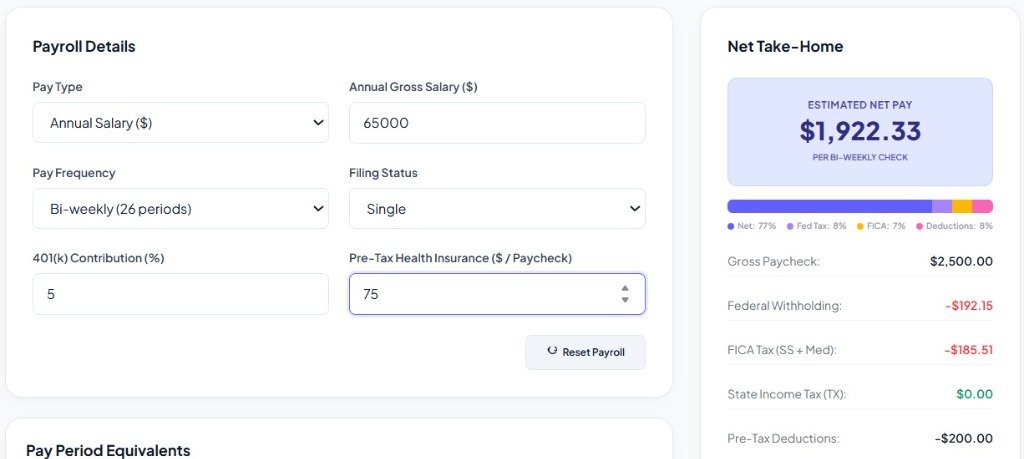
One of the biggest advantages of working in Texas is that the state does not impose a state income tax. This means employees only need to account for federal payroll taxes and any employer-sponsored deductions when calculating their net pay. Whether you're starting a new job, negotiating a salary, changing your W-4, or planning your monthly budget, a Texas Paycheck Calculator provides a fast and accurate estimate of your earnings.
This guide explains how Texas payroll works, what affects your paycheck, how to use a Texas Paycheck Calculator effectively, and answers frequently asked questions about payroll taxes in Texas.
What Is a Texas Paycheck Calculator?
A Texas Paycheck Calculator is an online financial tool that estimates the amount of money an employee takes home after mandatory payroll deductions.
The calculator generally considers:
- Gross salary or hourly wages
- Pay frequency
- Federal income tax withholding
- Social Security tax
- Medicare tax
- Retirement contributions
- Health insurance deductions
- Flexible Spending Accounts (FSA)
- Health Savings Accounts (HSA)
- Other pre-tax and post-tax deductions
The result is an estimated net paycheck, often called take-home pay.
Why Use a Texas Paycheck Calculator?
A paycheck calculator can help you:
- Estimate take-home income before accepting a job offer
- Compare salaries between employers
- Plan monthly expenses
- Budget for savings goals
- Calculate overtime earnings
- Understand payroll deductions
- Verify paycheck accuracy
- Estimate annual net income
Calculate Your Texas Take-Home Pay Now
Estimate your net paycheck after federal withholdings and pre-tax deductions.
How Payroll Works in Texas
Payroll in Texas follows federal tax regulations because Texas does not collect state income tax. Typical payroll deductions include:
Federal Income Tax
Federal income tax is withheld based on:
- Your filing status (Single, Married Filing Jointly, Head of Household) selected on your W-4 form.
- Your income level (bracket).
- Any additional withholding elections or dependent credits.
Federal Payroll Taxes (FICA)
These are standard taxes collected at the federal level to fund social welfare programs:
- Social Security Tax: Withheld at a rate of 6.2% on wages up to the annual wage base limit.
- Medicare Tax: Withheld at a rate of 1.45% on all wages. Wages over $200,000 (for single filers) are subject to an Additional Medicare Tax of 0.9%.
Texas Has No State Income Tax
One of the biggest financial advantages for Texas workers is the absence of a state income tax. Unlike states like California or New York where state income tax can take another 5% to 13% of your income, Texas workers only face federal tax liabilities. Consequently, Texas employees retain a larger portion of their gross salary.
Information Needed for a Texas Paycheck Calculator
To receive accurate estimates, you should enter:
- Gross salary or hourly wage rate
- Filing status (e.g. Single or Married)
- Number of pay periods (frequency)
- Pre-tax health insurance premiums
- Retirement contributions (e.g. 401k percentage)
- W-4 selections (dependents and extra withholdings)
Pay Frequencies
Most Texas employers pay employees using one of these schedules:
- Weekly (52 checks/year): Common for hourly jobs.
- Biweekly (26 checks/year): Paid every other week (e.g. every other Friday).
- Semi-monthly (24 checks/year): Paid twice a month (typically on the 15th and last day of the month).
- Monthly (12 checks/year): Common for executives or contract work.
Gross Pay vs. Net Pay
Gross Pay
Gross pay is your total earnings before any taxes or deductions are removed. It includes regular hours worked, overtime pay, commissions, and bonuses.
Net Pay
Net pay is the actual cash amount deposited into your bank account (take-home pay) after all taxes and benefits have been subtracted.
Payroll Deductions Explained
Pre-Tax Deductions
Pre-tax deductions are taken out of your gross pay before taxes are calculated, which reduces your taxable income. Examples include:
- Traditional 401(k) or 403(b) retirement plans.
- Health Savings Accounts (HSA) and Flexible Spending Accounts (FSA).
- Pre-tax health, dental, and vision insurance premiums.
Post-Tax Deductions
Post-tax deductions are taken out after taxes have been calculated and withheld. Examples include:
- Roth 401(k) retirement plans.
- Union dues or professional association fees.
- Wage garnishments (child support, tax levies).
Hourly Employees
Hourly employees calculate earnings using:
\[\text{Gross Pay} = (\text{Hourly Rate} \times \text{Regular Hours}) + (\text{Overtime Rate} \times \text{Overtime Hours})\]Hourly workers are subject to the same federal taxes and benefit deductions.
Salaried Employees
Salaried workers receive a fixed annual salary divided according to their employer's pay schedule:
\[\text{Pay Period Gross Pay} = \frac{\text{Annual Gross Salary}}{\text{Number of Pay Periods}}\]Overtime Pay
Under the Fair Labor Standards Act (FLSA), eligible non-exempt employees must receive overtime pay for hours worked over 40 in a workweek. The overtime rate is at least 1.5 times the regular hourly rate.
Bonuses and Commissions
Supplemental income like bonuses, commissions, and awards is subject to federal withholding. Lenders and employers may use either the percentage method (flat 22% withholding) or the aggregate method to calculate withholding on supplemental pay.
Retirement Contributions
Contributing to a traditional employer-sponsored 401(k) reduces your immediate federal income tax liability because the funds are deducted pre-tax. Roth contributions, however, do not lower your current taxable income but grow tax-free.
Benefits of Using a Texas Paycheck Calculator
- Quick salary estimates: See how much net income a new salary offer actually yields.
- Better budgeting: Plan your rent, mortgage, and daily expenses using net cash flow.
- Job offer comparison: Evaluate total compensation packages between different states or local employers.
- Income verification: Cross-check your pay stub to ensure FICA and federal withholdings are accurate.
Common Payroll Mistakes
- Incorrect W-4 information: Incorrect filing status or claiming incorrect dependents can cause under-withholding (tax bill) or over-withholding (refunding the IRS interest-free).
- Missing overtime rates: Ensure non-exempt overtime hours are paid at 1.5x.
- Incorrect benefit deductions: Confirm health insurance and 401(k) selections match your pay stub.
Who Can Benefit?
A Texas Paycheck Calculator is useful for:
- Employees managing personal budgets.
- Job seekers evaluating competitive Texas salary offers.
- HR professionals verifying payroll setups.
- Small business owners structuring employee compensation.
Tips for More Accurate Estimates
- Use your latest pay stub: Match pre-tax deductions exactly.
- Enter correct pay frequency: Semi-monthly (24 checks) is often confused with biweekly (26 checks).
- Include all deductions: Don't forget FSA, HSA, or disability insurance costs.
Conclusion
A Texas Paycheck Calculator is an essential tool for understanding your real earnings after payroll deductions. Whether you're evaluating a job offer, planning your household budget, or verifying your paycheck, this calculator provides valuable insight into your take-home pay.
Because Texas has no state income tax, estimating your paycheck is generally more straightforward than in many other states. By entering accurate salary, tax, and deduction information, you can make informed financial decisions and better manage your income throughout the year.
Frequently Asked Questions (FAQs)
1. What is a Texas Paycheck Calculator?
A Texas Paycheck Calculator estimates your take-home pay after federal taxes and payroll deductions.
2. Does Texas have state income tax?
No. Texas does not impose a state income tax on wages.
3. What information do I need to use the calculator?
You'll typically need your gross pay, pay frequency, filing status, W-4 details, and any deductions such as retirement contributions or insurance premiums.
4. Does the calculator include Social Security and Medicare?
Yes. Most Texas Paycheck Calculators estimate these federal payroll taxes.
5. Can hourly employees use the calculator?
Yes. Hourly workers can enter their hourly rate and hours worked, including overtime if applicable.
6. Does the calculator estimate overtime pay?
Many calculators allow you to include overtime hours to estimate higher earnings.
7. Are bonuses included?
Yes. Many paycheck calculators let you include bonuses, commissions, or other supplemental income.
8. Is the calculator 100% accurate?
It provides an estimate. Your actual paycheck may vary depending on your employer's payroll system, benefit elections, and tax withholding.
9. Can I use it to compare job offers?
Yes. Comparing estimated net pay rather than just gross salary can help you evaluate different employment opportunities.
10. Why is my take-home pay lower than expected?
Federal income tax, Social Security, Medicare, retirement contributions, health insurance, and other deductions all reduce your net paycheck.