Whether you're starting a new job, negotiating a salary, budgeting your monthly expenses, or simply curious about how much money you'll actually receive after taxes, an Arkansas Paycheck Calculator is one of the most useful financial tools available. Instead of guessing your take-home pay, this calculator estimates your net income by considering federal taxes, Arkansas state income tax, Social Security, Medicare, and other payroll deductions.
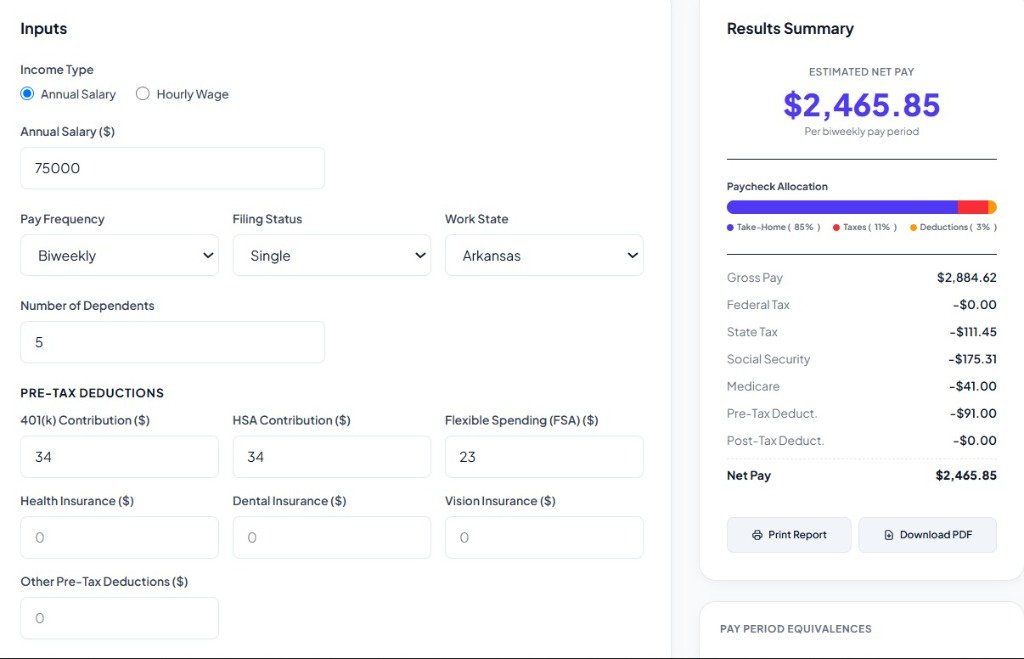
Understanding your paycheck is essential because your gross salary is rarely the amount deposited into your bank account. Taxes, retirement contributions, insurance premiums, and other deductions all reduce your final earnings.
This guide explains everything you need to know about using an Arkansas Paycheck Calculator, how payroll taxes work in Arkansas, and how you can maximize your take-home income.
What Is an Arkansas Paycheck Calculator?
An Arkansas Paycheck Calculator is an online tool designed to estimate the amount of money you'll receive after mandatory payroll deductions. It calculates:
- Gross Pay
- Federal Income Tax
- Arkansas State Income Tax
- Social Security Tax
- Medicare Tax
- Retirement Contributions
- Health Insurance Deductions
- Other Pre-tax or Post-tax Deductions
- Net Pay (Take-Home Pay)
Instead of manually calculating payroll taxes, the calculator performs everything automatically within seconds.
Why Use an Arkansas Paycheck Calculator?
Many people only focus on annual salary, but your real income depends on what remains after deductions. Benefits include better monthly budgeting, salary comparison, job offer evaluation, tax planning, overtime calculations, payroll verification, financial planning, and savings estimation. Whether you're paid weekly, biweekly, semimonthly, or monthly, the calculator provides a realistic estimate of your paycheck.
How an Arkansas Paycheck Calculator Works
The calculator follows several simple steps:
- Step 1: Enter Gross Pay - Your gross pay is your earnings before taxes. Examples include annual salary, hourly wage, overtime, bonus, or commission.
- Step 2: Select Pay Frequency - Common options include weekly, biweekly, semi-monthly, monthly, quarterly, and annual.
- Step 3: Enter Filing Status - Federal tax withholding depends on your filing status: Single, Married Filing Jointly, Married Filing Separately, or Head of Household.
- Step 4: Add Federal Withholding Information - Your IRS Form W-4 details (dependents, credits, extra withholding) affect the calculations.
- Step 5: Calculate Arkansas State Tax - Arkansas collects a progressive state income tax, so your paycheck includes state tax withholding based on applicable brackets.
- Step 6: Calculate FICA Taxes - Subtracted FICA taxes fund Social Security (6.2%) and Medicare (1.45%).
- Step 7: Subtract Benefits - Optional deductions like health insurance, dental insurance, vision insurance, HSA/FSA, or retirement contributions.
- Step 8: Calculate Net Pay - The final take-home pay remains.
What Information Do You Need?
To obtain accurate results, prepare your gross salary or hourly wage details, hours worked, overtime hours, bonuses, pay frequency, filing status, retirement contributions, insurance deductions, and additional tax withholding requirements.
Arkansas Payroll Taxes Explained
Your paycheck is subject to several types of withholding:
- Federal Income Tax: Determined by federal progressive brackets and your W-4 status.
- Arkansas State Income Tax: Arkansas collects a progressive state tax on income with brackets scaling from 2.0% up to a maximum rate of 4.40% for the 2026 tax year. Local municipal income taxes are not levied in Arkansas.
- Social Security (6.2%): Deducted up to the federal wage base cap.
- Medicare (1.45%): Paid on all wages, with an additional surcharge on high earners.
- Pre-Tax Deductions: Contributions like 401(k) retirement and health insurance premiums are deducted before tax, reducing your taxable income.
- Post-Tax Deductions: Items like Roth retirement plans and garnishments are deducted after tax calculations.
Salary Employees vs Hourly Employees
Salary Employees: Income stays relatively stable. For example, an annual salary of $70,000 paid monthly yields a stable gross of $5,833, although actual net pay may vary slightly due to seasonal tax adjustments.
Hourly Employees: Income depends directly on hours worked, overtime, holiday pay, shift differentials, and bonuses. An Arkansas Paycheck Calculator quickly estimates take-home pay for changing work schedules.
Pay Frequency Options
Employers typically pay workers weekly (52 checks/year), biweekly (26 checks/year), semi-monthly (24 checks/year), or monthly (12 checks/year). The paycheck calculator automatically adjusts its progressive tax withholding rules based on your selected frequency.
Example Arkansas Paycheck Calculation
Suppose you are a Single filer earning an annual salary of $60,000, paid biweekly with zero deductions. Your gross pay per period is:
\(\$60,000 \div 26 = \$2,307.69\)
After subtracting federal taxes, progressive Arkansas state taxes, Social Security, and Medicare, the remaining amount is your estimated biweekly take-home pay.
Below are hourly wage examples based on a standard 40-hour work week for a Single filer in Arkansas with zero deductions:
| Hourly Rate | Weekly Gross | Biweekly Net | Monthly Net |
|---|---|---|---|
| $20/hr | $800.00 | $1,310.51 | $2,839.45 |
| $30/hr | $1,200.00 | $1,918.11 | $4,155.91 |
| $40/hr | $1,600.00 | $2,461.48 | $5,333.21 |
Here are annual salary examples for a Single filer in Arkansas with zero deductions:
| Annual Gross Salary | Biweekly Gross | Estimated Net (Per Period) | Estimated Net (Annual) |
|---|---|---|---|
| $40,000 | $1,538.46 | $1,263.78 | $32,858.16 |
| $60,000 | $2,307.69 | $1,848.01 | $48,048.16 |
| $80,000 | $3,076.92 | $2,380.31 | $61,888.16 |
| $100,000 | $3,846.15 | $2,887.62 | $75,078.16 |
Benefits of Using an Arkansas Paycheck Calculator
- Better Budgeting: Know exactly how much money you'll receive on payday.
- Compare Job Offers: A higher salary doesn't always translate directly to a larger take-home pay due to tax brackets.
- Plan Savings: Establish accurate monthly savings targets.
- Estimate Overtime: Instantly check how overtime earnings will boost your net pay.
- Verify Payroll: Confidently double-check your paystub for employer compliance.
Common Payroll Deductions
Many employees see deductions such as federal tax, state tax, Social Security, Medicare, 401(k), health, dental, vision, disability, and life insurance premiums on their check stub.
Common Payroll Mistakes
To avoid incorrect paycheck expectations, watch out for these errors: ignoring overtime, selecting the wrong filing status, forgetting supplemental bonus income, providing outdated W-4 settings, ignoring retirement contributions, choosing the wrong pay frequency, or leaving out dependent credit details.
Who Should Use an Arkansas Paycheck Calculator?
This calculator is highly useful for employees, hourly wage workers, salary negotiators, freelance contractors, payroll HR specialists, and students preparing for the workforce in Arkansas.
How to Increase Your Take-Home Pay
Consider these strategies to optimize your net earnings:
- Increase retirement contributions to lower your overall taxable wages.
- Update your W-4 form after significant life events (marriage, birth of a child).
- Enroll in pre-tax health savings or flexible spending accounts.
- Periodically audit your tax withholdings to avoid huge refunds or penalties.
When Should You Use an Arkansas Paycheck Calculator?
We recommend running your numbers whenever you start a new job, receive a salary increase, earn overtime or bonuses, adjust W-4 options, or plan your household budget.
Tips for Accurate Results
Always use your most current pay information, make sure the pay frequency is correct, include supplemental bonuses, enter pre-tax deductions accurately, and update details whenever your compensation packages shift.
Frequently Asked Questions (FAQs)
1. What is an Arkansas Paycheck Calculator?
An Arkansas Paycheck Calculator estimates your take-home pay after federal taxes, Arkansas state income tax, Social Security, Medicare, and other deductions.
2. Is the calculator free?
Most online Arkansas paycheck calculators are free to use.
3. Does Arkansas have state income tax?
Yes. Arkansas collects state income tax, and employers generally withhold it from employee paychecks.
4. Does Arkansas have local income tax?
No. Arkansas does not impose local income taxes on wages.
5. Can hourly workers use an Arkansas Paycheck Calculator?
Yes. Hourly employees can enter their hourly rate and hours worked to estimate take-home pay.
6. Can salaried employees use it?
Absolutely. Salaried workers can estimate net pay based on annual or per-pay-period earnings.
7. Does overtime affect my paycheck?
Yes. Overtime increases gross wages and can also increase tax withholding.
8. Does the calculator include Social Security and Medicare?
Yes. Most paycheck calculators include both FICA taxes in the estimate.
9. Can I calculate bonuses?
Yes. Many calculators allow you to include bonuses, commissions, and other supplemental wages.
10. Is the result exact?
No. It provides an estimate. Your actual paycheck may differ because of employer-specific deductions, benefit elections, or updated tax rules.
Final Thoughts
An Arkansas Paycheck Calculator is an essential financial tool for employees, employers, and anyone planning their finances. By estimating federal and Arkansas state tax withholding, FICA taxes, and optional payroll deductions, it gives you a realistic picture of your take-home pay before payday.
Whether you're evaluating a new job offer, tracking overtime earnings, planning a household budget, or checking payroll accuracy, using an Arkansas Paycheck Calculator can help you make more informed financial decisions. Keeping your W-4 information current and reviewing your deductions regularly will also improve the accuracy of your paycheck estimates.